Label Crop: Free Shipping Label Cropper for 4x6 Printers
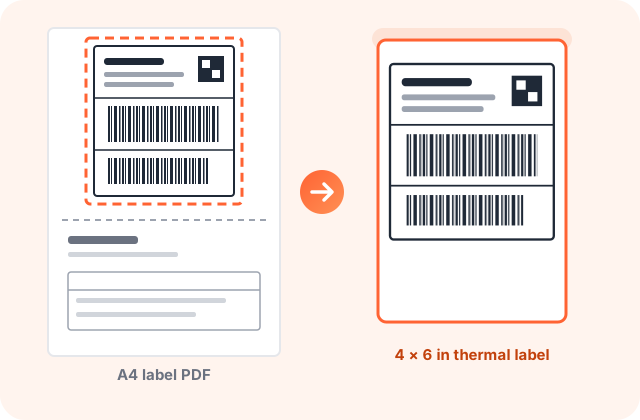
Drop your Flipkart, Meesho or Amazon label PDF. Each shipping label is found, cropped and set on a 4x6 page, ready for your thermal printer.
- Free
- No sign-up
- Bulk PDFs
- Barcodes stay sharp
Upload label PDFs
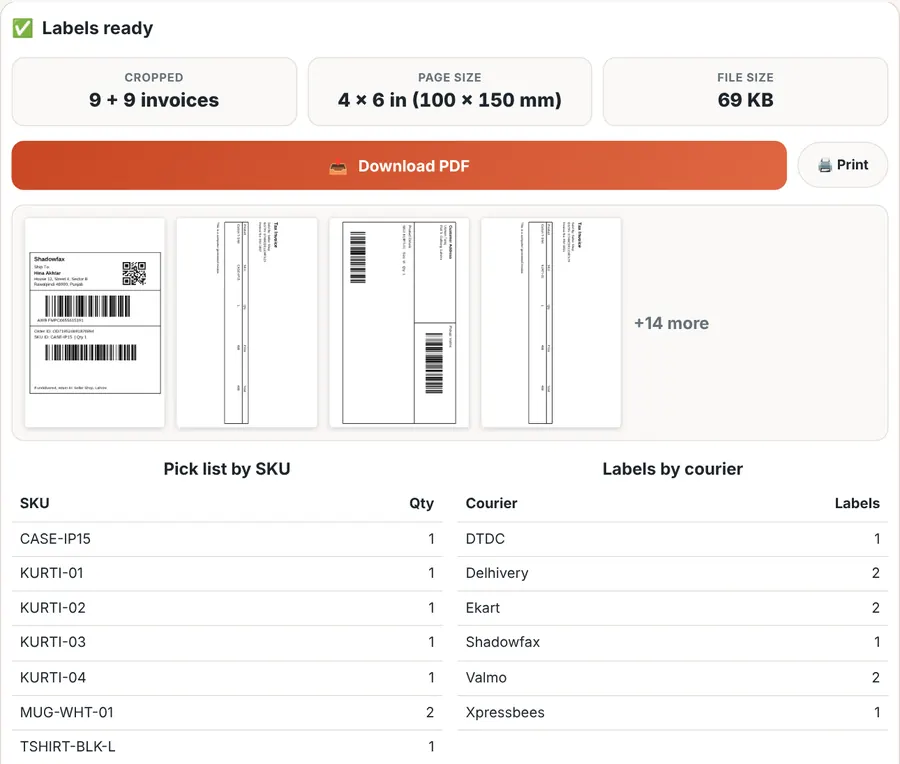
Labels ready
Adjust crop box
Drag the corners or the box. The same box is used on every page, which suits PDFs where each page has one label in the same place.
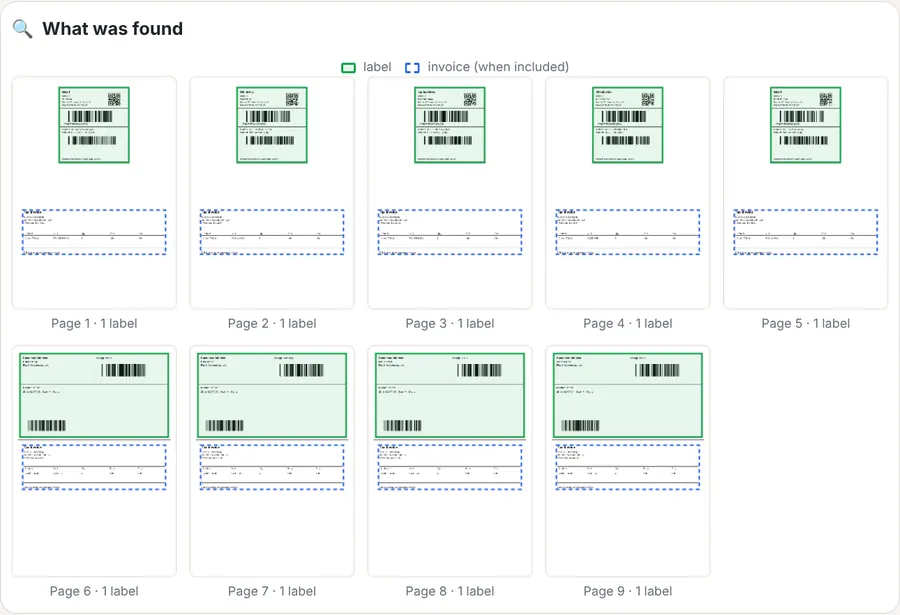
What was found
label invoice (when included)
What Is Label Crop?
Label crop is the job of cutting the shipping label out of an A4 label PDF so it prints on a 4x6 thermal label. PDFdukan’s label crop tool finds each label in your PDF, crops it, and places it on a 4x6, 4x4, 3x5, A6 or A4 page, ready for your label printer.
Marketplaces such as Flipkart, Meesho and Amazon give sellers labels as A4 pages, often with the tax invoice on the same sheet. Printing that page on a thermal printer shrinks the barcode or cuts it off. A shipping label cropper fixes that in one step, and this one works on a phone or laptop with no app.
How Do You Crop a Shipping Label?
You crop shipping labels with PDFdukan in four steps:
- Download your label PDF from the seller panel, the same file you would normally print on A4.
- Drop it here. Add one PDF or many at once. Labels are found and cropped right away.
- Pick your options: label size, label with or without invoice, and the order you want to pack in.
- Download or print. Tap Download PDF, or Print to send it straight to your label printer.
Which Label PDFs Does It Work With?
The tool looks for the barcode block on each page, so it does not depend on one marketplace’s layout. It handles these common layouts:
- Label on top, invoice below, split by a dashed or solid line. This is the usual Flipkart and Meesho label format.
- One label in a corner of an A4 page with notes or an invoice elsewhere, as many Amazon self-ship and courier PDFs do.
- 2 or 4 labels per A4 sheet. Each label becomes its own 4x6 page.
- Scanned or photographed label PDFs. Detection works on the page image, not the text.
- PDFs that are already 4x6. They pass through and can be merged with others into one print file.
Flipkart’s own seller API describes its label file as an integrated shipping label with an optional invoice, merged into one PDF for many shipments. That is exactly the file this tool splits. If a label is ever missed, tap Adjust crop box, drag one box over the label, and it is used on every page.
Which Label Size Should You Choose?
Choose the size of the labels loaded in your printer:
| Option | Page size | Use it for |
|---|---|---|
| 4 × 6 in | 101.6 × 152.4 mm | Standard thermal shipping labels (often sold as 100 × 150 mm) |
| 4 × 4 in | 101.6 × 101.6 mm | Square rolls some Meesho and small sellers use |
| 3 × 5 in | 76.2 × 127 mm | Smaller rolls for light parcels |
| A6 | 105 × 148 mm | A6 label stock, common outside India |
| A4 · 2 or 4 per sheet | 210 × 297 mm | Laser or inkjet printers with sticker sheets |
| Original size | Same as the label | Keep the crop exactly as it is |
4x6 is the default because it is the shipping industry’s standard label: ShipEngine’s label documentation lists 4" × 6" (100 × 150 mm) as the default size for every label format. Labels are scaled to fill the page, and wide labels are turned sideways when that makes them bigger. You can switch rotation off.
Can You Keep the Invoice?
Yes. Pick one of three invoice options:
Labels only
The default. Only the shipping labels, one per page, for the parcel.
Label + invoice
Each invoice is cropped and printed right after its own label, so the pair stays together for the box.
Invoices only
Just the invoices, for your records or to print on A4 later.
Many files at once
Add every label PDF of the day. They come out as one print file in the order you choose.
How Do You Sort Labels by SKU or Courier?
Tap Sort by SKU or Sort by courier before you print. The tool reads the SKU and courier name printed on each label, such as Ekart, Delhivery, Xpressbees, Shadowfax, Valmo, DTDC or Amazon Shipping, and reorders the pages. Packing goes faster when all orders of one product, or all parcels for one pickup, sit together.
Below the preview you also get a pick list: each SKU with its total quantity, and a count of labels per courier. Use it to collect stock before you pack and to check the pickup count with the courier.
Sorting needs the text inside the PDF. Labels from seller panels have it. A scanned label PDF has no text layer, so its labels keep their original order.
Why Do Barcodes Stay Sharp?
The label is not turned into a picture. The tool places the original page inside the new 4x6 page and hides everything outside the label, using the open-source pdf-lib library. Text and barcode bars stay as vector shapes, so the courier’s scanner reads them at any size and the file stays small. A 200-label print file from our test was under 1 MB.
How Do You Print Cropped Labels on a Thermal Printer?
Most thermal label printers sold for e-commerce (TVS, Zebra, TSC, HPRT, iDPRT and similar) print a 4x6 PDF the same way:
- Set the printer’s paper size to 4 × 6 in or 100 × 150 mm in its driver.
- In the print window, choose Actual size or 100% scale, not “Fit to page”.
- Keep orientation on Portrait; the tool has already rotated wide labels.
- If bars look faint, raise the printer’s darkness a step in its driver settings.
If the first label prints shifted, calibrate the printer to the label gap (usually by holding the feed button) and print again.
How Does It Compare With Other Label Croppers?
Most label croppers are built for one marketplace at a time. Here is what differs, based on the tools’ own pages in November 2026:
| Feature | PDFdukan Label Crop | Typical label cropper |
|---|---|---|
| Marketplaces | Any label PDF with a barcode, plus a manual box | Separate pages per marketplace |
| Output sizes | 4x6, 4x4, 3x5, A6, A4 2-up and 4-up, original | Usually 4x6 only |
| Invoice | Labels only, label + invoice, or invoices only | Often with or without invoice |
| Sorting | By SKU or courier, with a pick list | Some sort by SKU; some only in paid plans |
| Files | Many PDFs at once; no file limit set by us | Some limit files per upload on free plans |
| Your files | Processed in your browser | Varies; check each tool’s policy |
Is My Label PDF Uploaded?
No. Label PDFs hold customer names, phone numbers and addresses, so the whole crop runs inside your browser tab. The file is not sent to PDFdukan’s servers. The page still loads analytics and ads, like the rest of the site.
What Label Crop Doesn’t Do
- It does not create labels or AWB numbers; it only crops the labels your marketplace gives you.
- It does not add or change SKU text on the label. Sorting uses the SKU that is already printed.
- Password-protected PDFs need Unlock PDF first.
- On a very large batch, an older phone works more slowly because your device does the work. In our test, a laptop cropped 200 pages in about 16 seconds.
Need something else for your orders? Merge PDF joins label files, Crop PDF trims any page, and Compress PDF shrinks invoices for email.
Frequently Asked Questions
Yes. Label Crop is free, needs no account and adds no watermark. We set no limit on files or labels.
Download the label PDF from the seller panel, drop it here and keep 4 × 6 in selected. Each label is cropped onto its own 4x6 page. Tap Download PDF or Print.
Yes. The tool finds the barcode block on any label PDF, so Meesho, Amazon and courier labels work the same way. If a layout is missed, use Adjust crop box once.
Yes. Choose Label + invoice and each invoice follows its own label. Choose Invoices only to get just the invoices.
Yes. Add several PDFs together or tap Add more PDFs. All labels come out in one print file.
Yes. The label is not turned into an image, so barcode bars stay sharp vector lines at any size. Print at Actual size or 100% scale.
Sorting reads the SKU printed in the PDF’s text. A scanned or photographed label PDF has no text layer, so it keeps its original order.
No. The crop runs in your browser tab, so customer names and addresses are not sent to PDFdukan’s servers.