Add Page Numbers to PDF Online
Number every page, skip the cover or start with i, ii for a thesis. See each page before you download.
Free · No sign-up · No watermark · Files stay on your device
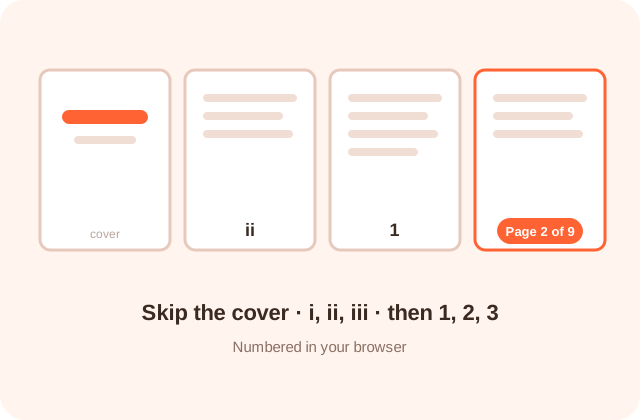
How Do You Add Page Numbers to a PDF Online?
To add page numbers to a PDF online with no sign up, drop the file into PDFdukan, choose where the number goes and how it reads, then tap Add page numbers. You get a new PDF with real text numbers on every page you picked, made in your browser.
The preview shows the exact number each page will carry, so you can check the cover and last page before you download.
The numbers are added as normal PDF text, not as an image, so readers can still search the document and the file stays small.
How Do I Number My PDF Pages Step by Step?
- Add your PDF. Tap Choose PDF or drop up to 20 files at once.
- Pick a quick setup. Use 1, 2, 3, Page 1 of 10, Skip cover or Thesis.
- Set the position. Choose a top or bottom corner, or the centre.
- Check the preview. Use the arrows to see what each page will show.
- Download. Tap Add page numbers; one file downloads at once, several as a ZIP.
What Page Number Options Do You Get?
Ten number formats
Choose 1, Page 1, 1 of 10, 1 / 10, - 1 -, i, I, a, or write your own text with {n} and {total}.
Skip pages and restart
Start on any page, stop before the appendix and begin counting at any number, such as 25 for chapter two.
Roman front matter
Give the first pages i, ii, iii, then switch to 1 for the body, all in one pass.
Double-sided printing
Mirror on even pages moves corner numbers to the outer edge of each printed sheet.
Bates-style labels
Add leading zeros and a prefix, like DOC-0001, for evidence bundles and audit files.
Hide old numbers
A white box behind the new number covers a wrong or duplicate number underneath.
Which Files, Fonts and Limits Apply?
| Item | Details |
|---|---|
| Input | PDF, up to 200 MB each, 20 files per batch |
| Output | Numbered PDF, or a ZIP for several files |
| Fonts | Helvetica, Times New Roman, Courier; bold; 6 to 36 pt |
| Style | Any color, 10 to 100% opacity, margin 0 to 40 mm |
| Locked PDFs | Restricted files work; password files need the password |
| Text | Latin letters and digits; other scripts show as ? |
Who Needs Page Numbers on a PDF?
- Students formatting a thesis with a plain cover and Roman front matter
- Law offices numbering exhibits and court bundles with DOC-0001 labels
- Teachers combining worksheets into one numbered packet for printing
- Teams sending contracts where clauses are discussed by page
How Do You Get Page Numbers Right the First Time?
Merge your files first, then add page numbers, so the count runs across the whole document. For a thesis, tap Thesis, set Roman pages first to the number of front pages, and check the first body page shows 1.
If a number lands on text or a footer line, raise the margin a few millimetres. For printed books, choose a bottom corner and tick Mirror on even pages so numbers sit on the outer edge.
Does It Handle Rotated or Scanned Pages?
Yes. PDFdukan reads each page’s rotation and visible area, so numbers stay upright and inside the page on landscape, rotated and cropped pages. In our tests, rotated pages in a mixed file kept their numbers at the bottom of the page as you see it. Scanned pages work too; the number is printed on top of the picture.
Is My PDF Uploaded to Add Numbers?
No. Your PDF is opened and numbered with pdf-lib and pdf.js inside your browser tab. Restricted files are unlocked with the open-source qpdf engine, also on your device. Nothing is sent to a server.
What Can’t This Tool Do?
PDFdukan adds page numbers only, not running headers, dates or names on every page; for those, use Add Watermark with your text. It can’t open a PDF whose password you don’t know, and numbers in Urdu, Arabic or Hindi digits aren’t supported yet.
Frequently Asked Questions
Yes. PDFdukan needs no account, adds no watermark and has no daily limit. Open the page, add your PDF and download the numbered copy.
Tap Skip cover, or set From page to 2. The cover stays blank and the second page shows 1. Change Start at if it should show another number.
Yes. Set Roman pages first to the number of front pages. Those pages show i, ii, iii and the body starts again at 1.
Choose Page 1 of 10 in Format. To leave the cover out of the total, set “of 10” counts to Only the numbered pages.
Only if the margin is too small. Check the preview, then raise the margin or move the number to the top of the page.
Yes. Add up to 20 PDFs. Each gets the same settings and its own count, and you download them together as a ZIP.
Yes for PDFs that only block editing; they are unlocked in your browser first. For a PDF that asks for a password to open, type its password.
Very little. PDFdukan uses the PDF’s built-in fonts, so a 300-page test file grew from 60 KB to 122 KB.